
Grocery delivery app Development Service

We help businesses build grocery delivery apps that make ordering daily essentials easy and fast for customers. Whether you want to start a new grocery delivery service or move your existing store online, we create simple and reliable apps that help you manage orders and grow your business.

Our grocery apps include features like product listing, easy search, secure payments, order tracking, and fast delivery management. We build apps for Android, iOS, and cross-platform solutions like Flutter and React Native.

From idea to launch, AppxService.com’ team handles everything — design, development, and support — so you can focus on serving your customers and increasing your sales.

grocery-app-development

Cost of Grocery app development

The cost of building a grocery delivery app depends on the features, design, and level of complexity you need. A simple app with basic features will cost less, while a larger platform with advanced features and multiple users will require a bigger investment.

Basic Grocery App ($8,000 – $15,000)

This is a good option for small businesses or local grocery stores starting online delivery. It includes basic features like product listing, cart, checkout, payment integration, and a simple admin panel to manage orders. It helps you launch quickly with essential functionality.

Advanced Grocery App ($15,000 – $30,000)

This option is suitable for growing businesses that need more control and better customer experience. It includes custom design, push notifications, real-time order tracking, inventory management, discounts, and advanced analytics. It helps improve customer engagement and increase sales.

Marketplace Grocery App ($25,000 – $60,000+)

This is for large platforms where multiple stores or vendors can sell their products. It includes vendor management, delivery partner system, advanced dashboard, and scalable backend. This type of app is more complex because it manages customers, vendors, and orders together.

Development time of Grocery app

The time required to build a grocery delivery app depends on the features, design, and overall complexity of the app. A simple app takes less time, while advanced apps with more features need more development time.

Basic Grocery App (1 to 2 Months)

A basic grocery app can be developed quickly if you need to launch fast. It includes essential features like product listing, cart, checkout, and simple order management. This is a good option for small businesses or local stores starting online delivery.

Advanced Grocery App (2 to 4 Months)

An advanced app takes more time because it includes extra features like custom design, real-time order tracking, push notifications, delivery scheduling, and better inventory management. This type of app provides a better experience for customers and more control for businesses.

Marketplace Grocery App (4 to 6 Months or More)

If you want a large platform where multiple stores or vendors sell products, development takes longer. These apps include vendor management, delivery partner system, advanced dashboard, and strong backend setup, which require more planning and testing.


Number of apps included for Grocery app

User App (Customer App)

The user app allows customers to browse grocery items, add products to their cart, make payments, and track their orders easily. It provides a simple and smooth shopping experience.

Admin App (Management Panel)

The admin app helps you manage the entire grocery business from one place. You can control products, manage orders, track customers, monitor sales, and handle overall operations.

Vendor App (Store Partner App)

The vendor app allows store owners or sellers to manage their products, update inventory, process orders, and track sales. It helps vendors manage their store easily on your platform.

Features of User Grocery app for a Business

Easy Product Search & Browsing

Customers can quickly find grocery items, browse categories, and search products easily with simple navigation.

Smart Product Recommendations

The app suggests products based on customer preferences and previous orders, making shopping faster and more convenient.

Secure Online Payments

Users can pay safely using multiple payment options like cards, UPI, or digital wallets.

Real-Time Order Tracking

Customers can track their grocery orders from placement to delivery, improving transparency and trust.

Delivery Time Slot Selection

Users can choose their preferred delivery time, making grocery shopping more flexible and convenient.

Offers, Discounts & Notifications

Customers receive updates about offers, discounts, and order status through push notifications.

Features of Admin Grocery app for a Business

Complete Business Dashboard

The admin dashboard shows all important information like total orders, sales, customers, and delivery status in one place. It helps you monitor and manage your grocery business easily.

Product & Inventory Management

You can add, edit, or remove grocery items and track stock levels in real time. This helps avoid out-of-stock issues and keeps products updated.

Order Management

Admins can view all grocery orders, update order status, manage cancellations, and handle customer requests smoothly.

Customer & Store Management

Manage customer accounts and grocery store/vendor registrations, approve sellers, and control platform access.

Sales Reports & Analytics

Get detailed reports on sales, revenue, and customer activity to understand performance and make better business decisions.

Discounts & Marketing Control

Create discount coupons, special offers, and promotional campaigns to attract more customers and increase orders.

Screens In user Grocery app

Splash Screen: This screen appears when the app opens. It shows the brand logo while the app loads and creates a good first impression.

Onboarding Screen: Introduces the app features and explains how grocery ordering works. It helps new users understand the app quickly.

Login / Signup Screen: Users can create an account or log in using email, phone, or social login. It helps save user details, addresses, and order history.

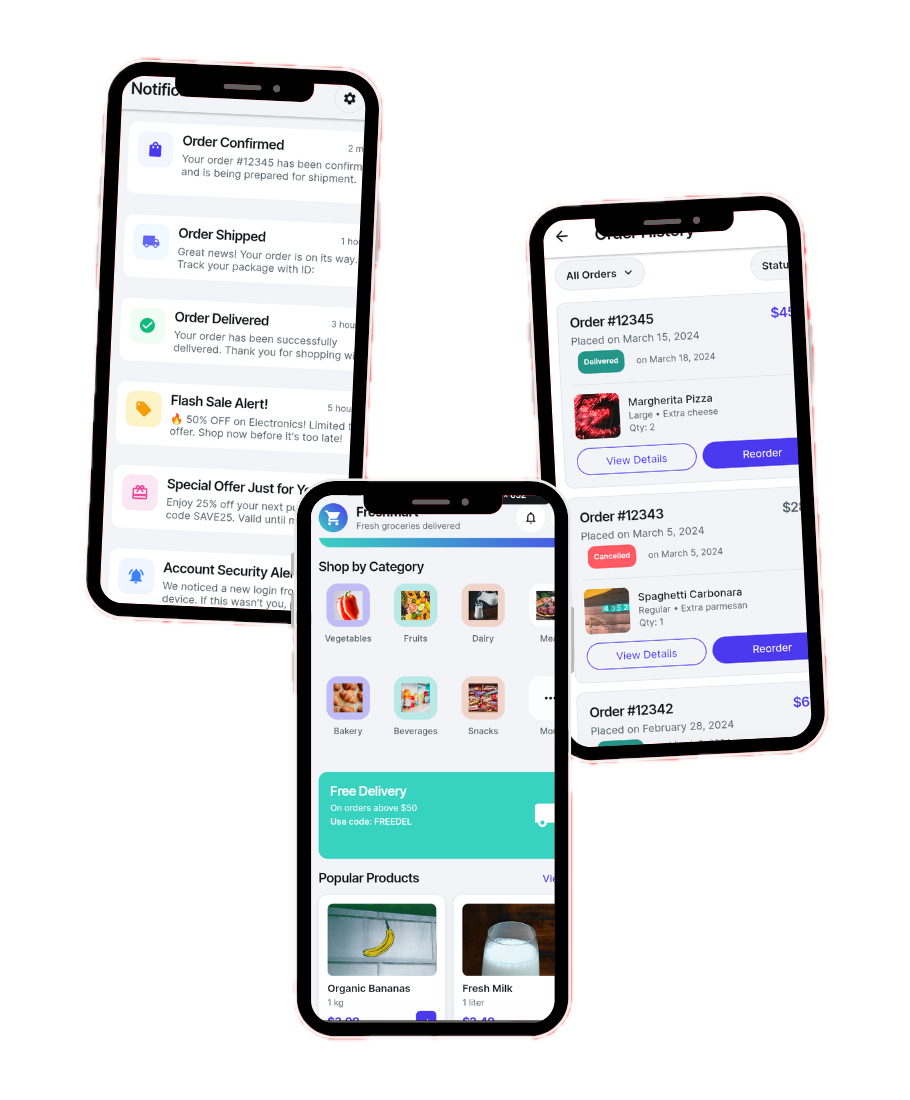
Home Screen: This is the main screen where users see featured products, categories, offers, and popular grocery items. It helps users quickly explore the app.

Product Categories Screen: Shows grocery categories like fruits, vegetables, dairy, snacks, beverages, etc., making it easier to find items.

Search Screen: Allows users to search for grocery items instantly using product names or keywords.

Product Listing Screen: Displays all products under a category with filters like price, rating, and popularity.

Product Details Screen: Shows full product information like images, price, description, quantity options, and reviews to help users make decisions.

Cart Screen: Users can view selected items, update quantity, remove products, and check total price before placing an order.

Checkout Screen: Users confirm delivery address, choose payment method, and place their order securely.

Payment Screen: Allows users to pay using cards, UPI, wallets, or cash on delivery.

Delivery Time Slot Selection Screen: Users can choose their preferred delivery time for grocery delivery.

Order Confirmation Screen: Shows order details after successful purchase and confirms that the order is placed.

Order Tracking Screen: Users can track their order status in real time from processing to delivery.

Order History Screen: Shows previous orders and allows users to reorder items quickly.

Wishlist Screen: Users can save grocery items to purchase later.

Notifications Screen: Shows updates about order status, offers, and promotions.

User Profile Screen: Users can manage personal details, addresses, payment methods, and account settings.

Support / Help Screen: Users can contact customer support or get help with orders and issues.

Screens In Admin Grocery app

Admin Login Screen: This screen allows the admin to securely log in to the system. It keeps business data safe and ensures only authorized people can manage the app.

Dashboard Screen: The dashboard gives a quick overview of the whole business. It shows total sales, orders, customers, revenue, and app performance in one place so the admin can understand everything easily.

Product Management Screen: Admins can add new grocery products, edit details, update prices, upload images, and remove items. This helps keep the store updated and organized.

Category Management Screen: Admins can create and manage product categories like fruits, vegetables, dairy, snacks, etc. It helps organize products properly and improves customer browsing.

Inventory Management Screen: This screen helps track stock levels and product availability. It prevents out-of-stock issues and avoids selling unavailable items.

Order Management Screen: Admins can view all orders, update order status, manage returns or cancellations, and handle delivery details. It ensures smooth order processing.

Customer Management Screen: Shows customer information, order history, and account details. Admins can manage users and provide better customer support.

Vendor Management Screen (For Multi-Vendor Apps): If the app supports multiple sellers, admins can approve vendors, manage seller accounts, set commissions, and monitor vendor performance.

Delivery Management Screen: Admins assign delivery partners, track deliveries, and manage delivery status to ensure orders reach customers on time.

Payments & Transactions Screen: Shows all payment details, transaction history, refunds, and revenue records. It helps track financial activity clearly.

Offers & Discounts Management Screen: Admins can create coupons, discounts, and promotional offers to attract more customers and increase sales.

Reports & Analytics Screen: Provides detailed reports on sales, customer behavior, product performance, and revenue. It helps in making better business decisions.

Push Notification Management Screen: Admins can send notifications about offers, updates, and order status to users.

Screens in Vendor Grocery app

Vendor Login / Signup Screen: This screen allows vendors (shop owners or sellers) to register or log in to their account securely. It helps verify sellers and gives them access to manage their store.

Vendor Dashboard Screen: The dashboard shows an overview of the vendor’s business like total orders, sales, earnings, and product performance. It helps vendors quickly understand how their store is doing.

Product Management Screen: Vendors can add new grocery products, update product details, set prices, upload images, and remove items. It helps them manage their store products easily.

Inventory / Stock Management Screen: This screen helps vendors track product stock levels and update availability. It prevents out-of-stock issues and keeps inventory updated.

Order Management Screen: Vendors can view incoming orders, accept or reject orders, update order status, and prepare items for delivery.

Order History Screen: Shows all previous orders and transaction records. Vendors can check past sales and customer purchases.

Earnings / Payment Screen: Vendors can view their earnings, payment history, commission details, and withdrawal requests.

Delivery Status Screen: Allows vendors to track delivery progress and coordinate with delivery partners.

Offers & Discount Management Screen: Vendors can create discounts, special offers, and promotions to attract more customers and increase sales.

Customer Reviews & Ratings Screen: Vendors can view customer feedback and ratings for their products and improve service quality.

Notifications Screen: Shows updates about new orders, payments, offers, and important alerts.

Vendor Profile & Store Settings Screen: Vendors can update store details like shop name, address, contact information, delivery timing, and business settings.

Technologies we use for Grocery app development

Frontend (User Interface)

Frontend is what customers and vendors see and use inside the grocery app. We use modern technologies like Flutter, React Native, Swift, and Kotlin to build fast, smooth, and easy-to-use apps for both Android and iOS. This ensures a simple shopping experience, quick navigation, and attractive design.

Backend (Server & Logic)

The backend handles everything happening behind the scenes — like processing orders, managing users, handling payments, and updating product data. We use powerful technologies like Node.js, Laravel, and other secure frameworks to build reliable and scalable grocery app systems.

Database (Data Storage)

The database stores all important information such as user details, products, orders, payments, and delivery data. We use secure databases like Firebase, MongoDB, and MySQL to keep data safe, organized, and easily accessible.

Cloud Services

Cloud services help the grocery app run smoothly and handle large numbers of users at the same time. We use platforms like AWS and Google Cloud for secure hosting, fast performance, and better scalability.

Third-Party APIs & Integrations

To make the grocery app more powerful, we integrate useful services like payment gateways (UPI, Stripe, PayPal), SMS and email notifications, maps for delivery tracking, and push notifications. These integrations improve user experience and app functionality.


Security & Performance Tools

We follow strong security practices to protect user data and payments. Our apps include data encryption, secure login systems, and performance optimization tools to keep the app safe, fast, and reliable.

Our development process for Grocery app

At AppxService.com, we follow a simple step-by-step process to turn your grocery app idea into a working mobile app. We work with you at every stage to make sure everything matches your business needs and runs smoothly for your customers.

Understanding Your Idea: First, we understand your business, goals, and requirements. We discuss what type of grocery app you want — single store, multi-vendor marketplace, or delivery-based system. This helps us plan the right features and create the best solution for your business.

Planning & Design: After understanding your idea, we plan the app structure and design. Our team creates wireframes and user-friendly designs so the app looks clean, simple, and easy to use. We focus on smooth navigation and a good shopping experience.

App Development: Once the design is ready, our developers start building your grocery app using modern technologies. We develop all important features like product listing, cart, payments, order tracking, and admin management while ensuring speed, security, and performance.

Testing & Quality Check: Before launching, we test the app carefully to find and fix any bugs or issues. We check performance, security, and usability to make sure everything works perfectly on different devices.

Launch & Deployment: After testing, we launch your app on platforms like Google Play Store and Apple App Store. We help with setup, configuration, and publishing so your app goes live smoothly.

Support & Maintenance: Even after launch, we provide ongoing support, updates, and improvements. We help you add new features, fix issues, and keep your grocery app running smoothly.

Change Your Life

Find Your Inner Peace & Happiness

Scroll to Top